
Ever stared at the back of a power bank and felt completely lost?
You know those numbers meansomething. But what? “20000mAh.” “5V/2A.” “65W.” They’re like a secret code, and you don’t have the decoder ring. So you do what everyone does—pick the one with the biggest number and hope for the best.
Here’s the thing: those numbers actually tell you everything you need to know. You just need someone to translate.
Let’s crack the code.
| Parameter or Label | What It Means | What It’s Used For |
|---|---|---|
| mAh | The amount of electrical charge the battery can store and release | Only when combined with voltage can it accurately compare capacity |
| Wh | The total energy stored in the battery | Better suited for estimating charge cycles and device runtime |
| W | Input or output power | Indicates charging speed or what devices it can power |
| V / A | Voltage and current | Power can be calculated via V × A |
| PD / PPS / QC | Fast charging protocols | Determine whether the device can trigger fast charging |
| Input | The power input of the power bank | Determines how long it takes for the power bank itself to fully charge |
| Output | The power output of the power bank | Determines whether it can charge a phone, tablet, or laptop |
| Port Label | The maximum output capability of a single port | Different ports may have different output power |
| Display Code | Device status or protection code | The specific meaning usually depends on the brand and model |
1 The Capacity Trick: Why 20000mAh Won’t Charge Your Phone Four Times
Look at any power bank. The biggest number you’ll see is the mAh(milliamp hour). 20000. 30000. 50000. Bigger must be better, right?
Not exactly.
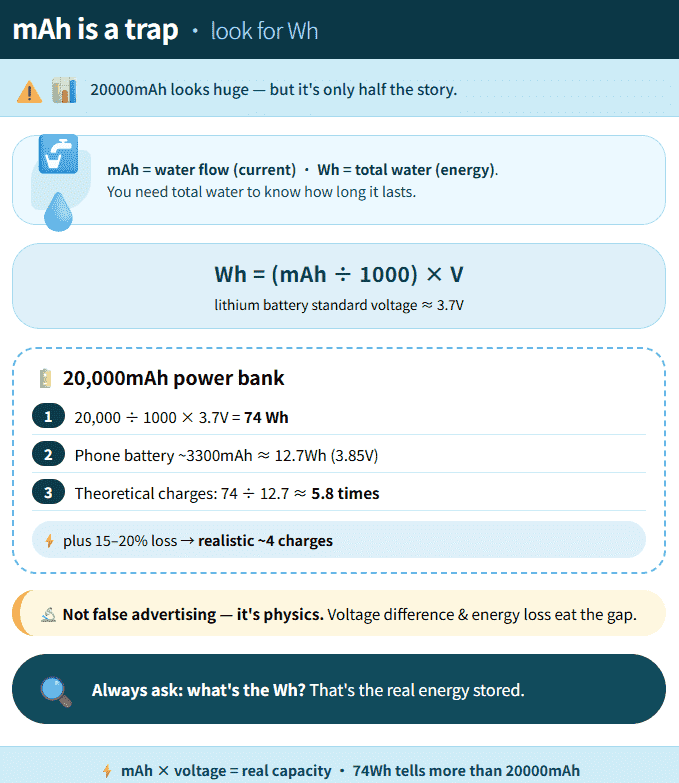
mAh measures “charge,” but it doesn’t measure “energy.”Think of it this way: mAh is like the size of your water pipe. Wh (watt-hour) is how much water actually comes out. One tells you potential. The other tells you reality.
Here’s the simple math:
Wh = mAh ÷ 1000 × V (voltage)
Most power banks run at 3.7V. So that 20000mAh power bank?
20000 ÷ 1000 × 3.7 =74Wh
That’s the actual energy stored.
Now your phone battery runs at a slightly higher voltage (around 3.85V). And during charging, you lose about 15-20% energy to heat and inefficiency. So when the math says you should get 5.8 charges, reality gives youaround 4.
This isn’t false advertising. It’s just physics.
Next time you’re shopping, ask yourself:What’s the Wh?That’s the number that actually matters.
2 The Speed Secret: Why Fast Charging Needs a Handshake
Ever bought a power bank that promised 65W fast charging, plugged in your phone, and… nothing. Charging speed feels exactly like that old 5W charger from ten years ago.
The power bank isn’t broken. The problem is the handshake.
Fast charging is simple math:
Watts = Volts × Amps
Want faster charging? Pump up the volts or crank up the amps. Easy.
But here’s the catch: your phone won’t let just anyone “pour” power into it. That’s dangerous. So before any fast charging happens, your phone and the power bank need to agree on the rules. They need to shake hands using the same language.
These languages have names:
PD (Power Delivery):This is the universal language. iPhones speak it. Nintendo Switches speak it. Most laptops speak it. If your power bank speaks PD, you’re covered for most modern devices.
QC (Quick Charge):This is Qualcomm’s language. Lots of Android phones speak it.
Private languages:Companies like OPPO (VOOC) and Huawei (SuperCharge) have their own secret handshakes. Only their own chargers usually speak them.
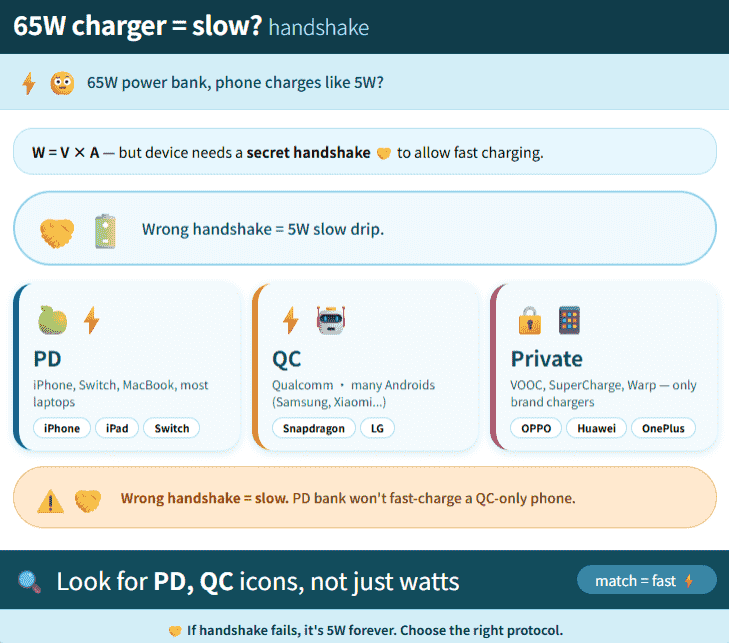
If your power bank doesn’t speak your phone’s language, they can’t shake hands. No handshake, no fast charging.They’ll still charge—just at boring old speeds.
So when you’re buying, don’t just look at the max wattage number. Ask:Does this speak my device’s language?
How can I confirm whether a power bank actually outputs 65W?
The 65W labeled on a power bank usually represents the maximum output power it can achieve under specific conditions. It doesn’t mean that any device will automatically get 65W once connected. And these specific conditions refer to: the power bank supports 65W output + the phone/computer supports PD and accepts 20V voltage + the cable supports 5A current. Only when all three are met can the specific conditions be considered fulfilled; missing any one of them makes it hard to achieve.
If you want to know the real output power, you can follow these steps to check gradually.
- Confirm that the receiving device supports high-power input
The charging power is determined by its weakest link. If the phone only supports up to 25W, even if connected to a 65W power bank, the actual power won’t exceed the phone’s receiving limit.
So, to test 65W output, it’s best to directly connect a laptop, tablet, or other device that supports 65W or higher power input.
- Use the correct port
Some power banks, although having a total output power of 65W, may only have one USB-C port capable of outputting 65W on its own. The other USB-C port might only have 20W, and the USB-A port might only have 18W. Therefore, you must check the label next to the port to confirm the power.
- Use a charging cable that supports the corresponding power
High-power USB-C charging actually has requirements for the cable’s build. If the cable only supports lower current, even if both the power bank and the device support 65W, the actual power may be limited to below 60W, or it may not even be able to use the high-power level properly.
- Read real-time data through the power bank’s screen or a USB power meter
If the power bank can display voltage and current, you can use the following formula to calculate:
Power (W) = Voltage (V) × Current (A)
For example: 20V × 3.25A = 65W
Alternatively, you can connect a USB-C power meter between the power bank and the device to directly view the real-time voltage, current, and power.
- Only connect one device during testing
When multiple devices are charged simultaneously, the power bank usually redistributes the power.
When using a single port: a certain port can output 65W;
When two ports are used simultaneously: it might become 45W + 18W, or 30W + 30W, and other combinations.
Therefore, when you want to test the maximum output power of a single port, you should ensure that only the device being tested is connected, to avoid other devices occupying the power.
- Check whether the fast charging protocols match
The power bank, charging cable, and device need to support compatible fast charging protocols.
If the power bank supports PD, but the device only supports the brand’s proprietary fast charging protocol, the actual power may be significantly lower than the rated value.
3 The Port Puzzle: Why Some Charge Laptops and Others Just Phones
Look at any modern power bank. You’ll see different holes:
USB-A:That classic rectangle you’ve been using forever
USB-C:The new oval one that plugs in either way
Some power banks even have two USB-C ports. But here’s the thing—not all USB-C ports are created equal.
USB-C is just a shape. Think of it like electrical outlets in your house. They all look the same, but some are connected to your lights, some to your kitchen appliances, and some to your AC unit. Same shape. Totally different jobs.
Here’s what’s really going on inside:
Basic USB-C:Just does charging. Slowly. Usually under 15W.
Mid-range USB-C:Speaks PD. Can hit 100W.
Full-featured USB-C:Does everything—charging, data transfer, even video out.
To charge a laptop, you need a USB-C port that speaks PD and can deliver enough power (laptops usually need 45W to 65W). It’s like needing a 220V outlet for your AC unit. Same shape as the 110V one, but not the same thing.
Also, power banks have smart chips inside that decide how to share power when you plug in multiple devices. Plug in one thing? Full speed. Plug in two? It might split into 45W + 18W, so both get something.
Look at the labels next to the ports.They tell you what each one can do. The information is right there.
What Does ICP Mean on a Power Bank?
ICP is not a universal power bank specification like mAh, Wh, PD or QC.
If “ICP” appears on a power bank display, it is usually a model-specific status, warning or protection code. Its exact meaning may vary between manufacturers.
Disconnect connected devices, check the cable and ports, and restart the power bank. If the code remains, check the manual for that exact model instead of assuming that ICP means the same thing on every power bank.
Now You Speak the Language
Battery capacity. Charging speed. Ports. Every number tells a story. Every spec means something.
Next time you’re staring at a power bank, you’ll know what to look for:
Check the Wh:mAh × 3.7 ÷ 1000 = actual energy. That’s the real number.
Match the handshake:PD? QC? Make sure your gear speaks the same language.
Read the port labels:Some are for phones. Some are for laptops. Don’t mix them up.
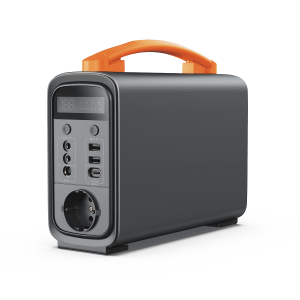
When we designed Piforz power stations, this is exactly what we thought about. Not just making numbers look big, but making them make sense. Clear labeling. Smart handshake support. Ports that do what they say.
Now you speak the language. Next time, you won’t guess. You’ll know.